Datastore configuration
Current vSphere Datastores
| Datastore Cluster | Datastore Member | Capacity | Description | Array |
|---|---|---|---|---|
| 3par-3par8400-cl1-cluster | virt-3par8400-cl1-vol1 | 6 TB | General Purpose | 3PAR 8400 |
| 3par-3par8400-cl1-cluster | virt-3par8400-cl1-vol2 | 6 TB | General Purpose | 3PAR 8400 |
| 3par-3par8400-mgmt-cluster | virt-3par8400-mgmt-vol1 | 6 TB | General Purpose | 3PAR 8400 |
| 3par-3par8400-mgmt-cluster | virt-3par8400-mgmt-vol2 | 6 TB | General Purpose | 3PAR 8400 |
| primera-a630-cluster | virt-primera-a630-vol1 | 6 TB | Performance | HPE Primera |
| primera-a630-cluster | virt-primera-a630-vol2 | 6 TB | Performance | HPE Primera |
Create a new VMFS Datastore
Note
Please keep all volumes and hosts in groups on the arrays using folders (Nimble) or VVSets/Hostsets (Primera) to simplify management.
- Create the volume(s) on the array.
- Add volume to existing vvset or folder for the vSphere cluster. If the VVSET or folder does not exist create one and add the volume(s).
- Verify the host(s) exists on the array. If it does not, create the host(s) on the array.
- Export the volume(s) to the host(s)/cluster(s).
- Login to vCenter server. Navigate to the cluster.
- Right click the vSphere host, click
Storage>Rescan Storage. (This may take a few minutes to complete) - Once rescan is complete, right click the vSphere host, click
Storage>New Datastore. - Choose
VMFS. Click Next. - Specify datastore name. Choose volume from list. Click Next.
- Choose
VMFS 6. Click Next. - (DEFAULT) Use all available parition. Click Next.
- Click Finish.
Please refer to VMware's documentation on this subject: Create a VMFS Datastore
Applying Permissions on Datastores
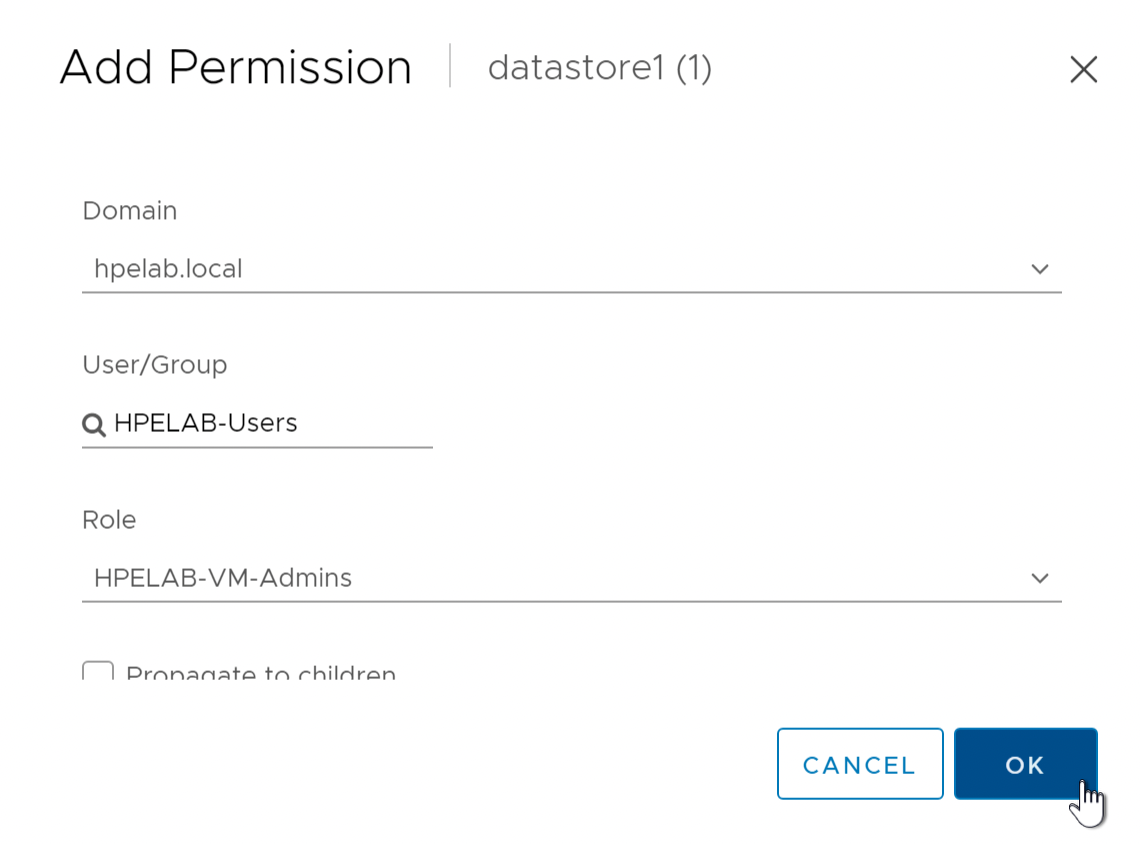
Standard users are not able to see newly created datastores. Permissions need to be configured on the datastores to allow users access to see and interact with new datastores.
- Go to Storage View (Menu > Storage).
- Expand
FTC-labDatacenter object. - Select the newly created datastore(s).
- Click the
Permissionstab. - Click the
+to add permissions. - Click
Domainand choosehpelab.localfrom the drop-down menu. - In
User\GrouptypeHPELAB-Users. - Choose the
HPELAB-VM-Adminsrole.