Proxy information
Self-managed Windows/Linux laptops at FTC site non-lab
Note
System managed by HPE IT will have proxy settings automatically updated.
In order to access the internet, configure the proxy.
- Click Windows key and type Internet Options.
- Click the Connections tab.
- Click LAN settings.
- Uncheck Automatically detect settings.
- Check Use automatic configuration script and enter url
http://proxy-lab.its.hpecorp.net
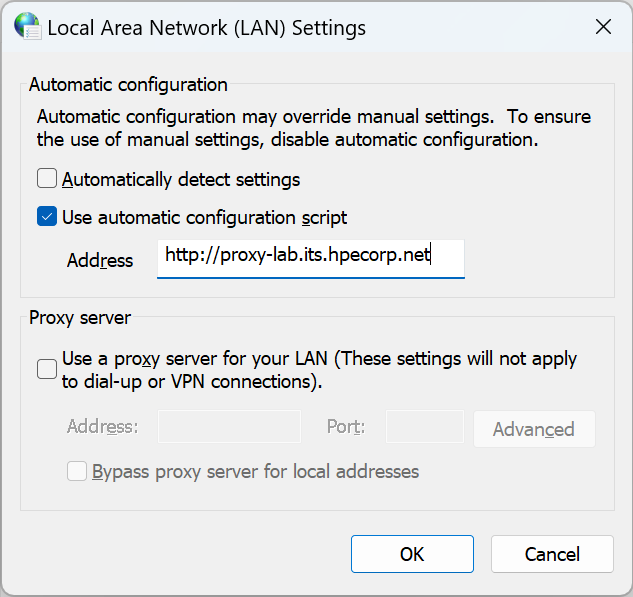
All Windows lab systems in the aaS environment.
Do NOT apply the URL http://proxy-lab.its.hpecorp.net to any FTC aaS equipment.
The corporate PAC file used does not allow bypassing local subnets or private lab domains. If you apply http://proxy-lab.its.hpecorp.net, you will be unable to access any internal systems on 192.168.16.0/21 subnet or *.hpelab.local domain.
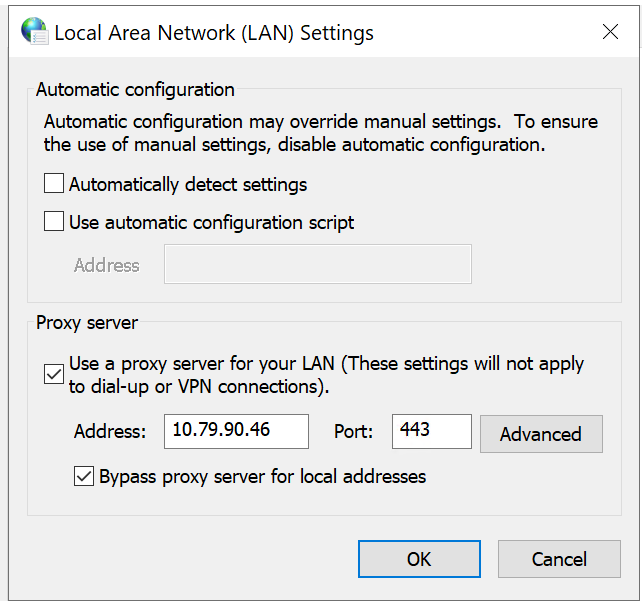
- To configure manual proxy, check Use a proxy server....
- In the Address field, enter the IP address
10.79.90.46. - In the Port field, enter the port number
443. - Click box to "Bypass proxy server for local addresses."
- Click Advanced to add any items to Exceptions to bypass proxy.
- 192.168.*
- *.hpelab.local
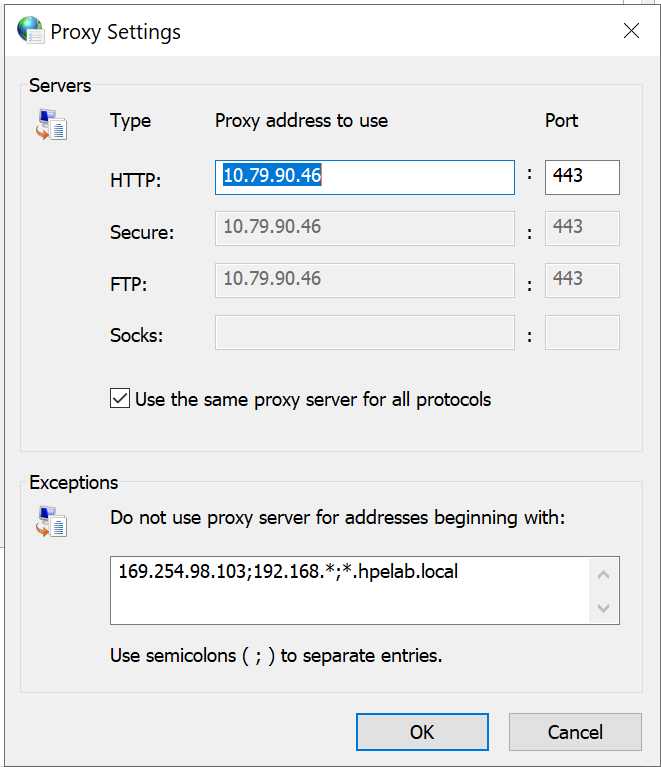
- Click OK; then click OK to close the Internet Properties window.
Linux Hosts
Create the following shell script:
vi proxy.shCopy the following into the script.
#/bin/bash

cat <<EOF >> /etc/environment
export http_proxy="http://10.79.90.46:8080"
export https_proxy="http://10.79.90.46:8080"
export no_proxy="localhost,127.0.0.1,0.0.0.0,10.10.0.0/16,cattle-system.svc,.svc,.cluster.local,.hpelab.local,172.17.0.0/16,16.0.0.0/8,192.0.0.0/8"
EOF

cat <<EOF >> /etc/bashrc
export http_proxy="http://10.79.90.46:8080"
export https_proxy="http://10.79.90.46:8080"
export no_proxy="localhost,127.0.0.1,0.0.0.0,10.10.0.0/16,cattle-system.svc,.svc,.cluster.local,.hpelab.local,172.17.0.0/16,16.0.0.0/8,192.0.0.0/8"
EOF

cat <<EOF >> /etc/profile.d/proxy.sh
export http_proxy="http://10.79.90.46:8080"
export https_proxy="http://10.79.90.46:8080"
export no_proxy="localhost,127.0.0.1,0.0.0.0,10.10.0.0/16,cattle-system.svc,.svc,.cluster.local,.hpelab.local,172.17.0.0/16,16.0.0.0/8,192.0.0.0/8"
EOF

mkdir -p /etc/systemd/system/docker.service.d/

cat <<EOF >> /etc/systemd/system/docker.service.d/no_proxy.conf
[Service]
Environment="NO_PROXY=localhost,127.0.0.1,0.0.0.0,10.10.0.0/16,cattle-system.svc,.svc,.cluster.local,.hpelab.local,172.17.0.0/16,16.0.0.0/8,192.0.0.0/8"
Environment="HTTP_PROXY=http://10.79.90.46:8080"
Environment="HTTPS_PROXY=http://10.79.90.46:8080"
EOF
Save and Exit.
Make the file executable.
chmod +x proxy.shRun the command and then reboot your host for the settings to take effect.
sudo ./proxy.sh